AuthMe + Proxy + Backend Bridge

Premium & Bedrock Auto-Login for AuthMe Networks

AuthMe Premium connects AuthMe Bungee or AuthMe Velocity with AuthMeReloaded so verified premium Java players and Floodgate Bedrock players can skip /login and /register on mixed-mode Minecraft networks.

Premium Java auto-login without typing passwords
Floodgate / Bedrock auto-authentication on supported proxy setups
Bukkit backend bridge for AuthMeReloaded, Vault sync, and proxy trust
3Storage providers
2Proxy platforms
1Backend bridge

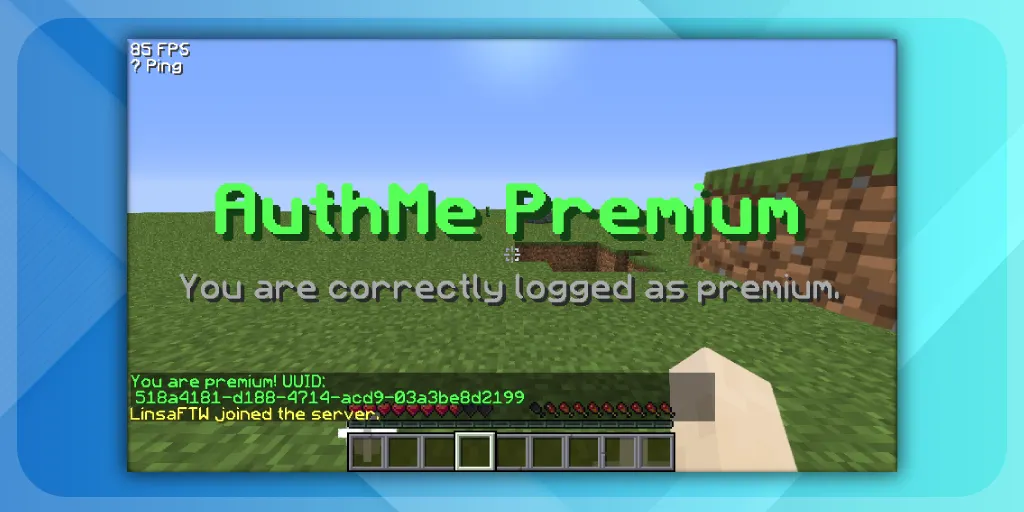
Premium flow preview
Player state icon
Player123
Cracked Account

The demo shows the user-facing difference between cracked and premium paths. Real proxy and backend logs are documented below.
Built for
BungeeCord / FlameCord
·
Velocity / VeloFlame
·
Floodgate Bedrock
·
AuthMeReloaded backend bridge
What ships today

Built for real AuthMe proxy + backend setups

The site and docs now mirror the actual product: proxy auto-login, backend trust approval, self-service commands, and optional Vault synchronization.

Premium Java auto-login

Verified premium players skip the normal AuthMe password flow on mixed-mode proxy networks.

Floodgate / Bedrock support

Optional Floodgate integration gives Bedrock players the same seamless auth experience.

Bukkit backend bridge

AuthMe Premium Bukkit completes backend auth, trust checks, and Vault state synchronization.

Proxy trust flow

Uses allowed-proxies.txt and pending-proxies.txt to protect backend force actions.

Self-service account mode

Players can use /premium, /cracked, and /premiumuuid when your policy allows it.

YAML / MySQL / Memory

Choose a simple file-based setup, persistent MySQL storage, or fast memory-only testing.

Vault cracked/premium sync

Optionally add or remove groups on the backend when premium or cracked state changes.

Admin review tools

Review pending proxy UUIDs, approve or reject them, and manage player premium state from the proxy.

Architecture

How the network flow works

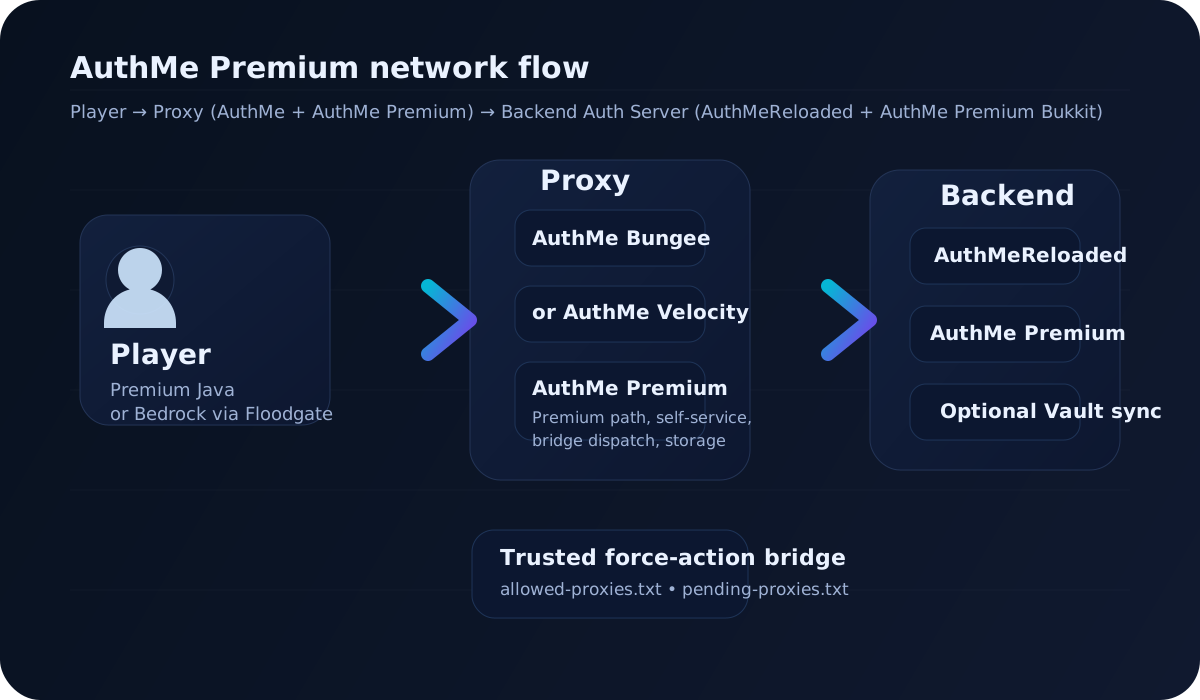
One proxy component handles premium detection and one backend component completes trusted AuthMe actions on the auth server.

Architecture
1. Player joins proxy.
2. AuthMe Premium on BungeeCord or Velocity decides the premium / cracked / Bedrock path.
3. Verified premium sessions are bridged to the backend auth server.
4. AuthMe Premium Bukkit validates the proxy UUID, applies the backend action, and acknowledges success.
5. Optional Vault sync updates cracked/premium groups on the backend.
Reference

Commands you can actually use

The website now reflects the current source code instead of template placeholders.

Player self-service

$/premium alias: /premplayer
Enable premium mode for yourself. Can require confirmation and optionally kick for clean rejoin verification.
$/cracked alias: /crackplayer
Disable premium mode for yourself and sync cracked state to the backend bridge when present.
$/premiumuuidplayer
Toggle premium UUID behavior for your own account.

Proxy admin

$/authmepremium setpremium <player> <true|false>proxy
Set premium mode for a target player.
$/authmepremium check <player>proxy
Check whether a player is stored as premium.
$/authmepremium clear [player]proxy
Clear one player or all stored premium data.
$/authmepremium setpremiumuuid <player> <true|false>proxy
Set premium UUID mode for a target player.
$/authmepremium reloadproxy
Reload the proxy plugin configuration and messages.

Backend Bukkit admin

$/authmepremium pendingproxiesbackend
List proxy UUIDs waiting for manual review.
$/authmepremium approveproxy <uuid>backend
Trust a pending proxy UUID and move it to allowed-proxies.txt.
$/authmepremium rejectproxy <uuid>backend
Reject a pending proxy UUID and remove it from the pending list.
Permissions: authmepremium.usage for proxy admin commands, authmepremium.admin for backend proxy-review commands, and optional self-service permissions when self-service-commands.require-permission=true.
Security + operations

Proxy trust & backend bridge

AuthMe Premium Bukkit only accepts trusted proxy force-actions. First install is easy, later changes stay explicit.

Files on the backend

  • allowed-proxies.txt stores approved proxy UUIDs.
  • pending-proxies.txt stores unknown proxy UUIDs waiting for review.
  • If the approved list is empty, the first proxy UUID is auto-approved to simplify first setup.
  • After that, new unknown UUIDs go to pending until approved or rejected manually.

Review flow

  • List pending UUIDs with /authmepremium pendingproxies.
  • Approve a UUID with /authmepremium approveproxy <uuid>.
  • Reject a UUID with /authmepremium rejectproxy <uuid>.
  • Expected backend logs are documented on the docs page for diagnosis.
Getting started

Five-step installation

The setup now documents the missing backend Bukkit component and trust flow from the actual product.

01

Install AuthMeReloaded on the backend auth server

Your Paper / Spigot auth server still uses AuthMeReloaded as the backend authentication plugin.

02

Install AuthMe Bungee or AuthMe Velocity on the proxy

Use the proxy-side AuthMe integration that matches your network platform.

03

Install AuthMe Premium on the proxy

This handles premium detection, self-service commands, premium UUID mode, and bridge dispatch.

04

Install AuthMe Premium Bukkit on the backend auth server

This is what skips backend /login and /register, applies trust checks, and runs optional Vault sync.

05

Configure storage, trust, and optional integrations

Choose YAML, MySQL, or memory, enable optional Floodgate / Vault, and validate the proxy UUID trust flow.

Player → Proxy (AuthMe + AuthMe Premium) → Backend Auth Server (AuthMeReloaded + AuthMe Premium Bukkit)
Support-first docs

Expected backend logs

These are the operational log lines administrators should look for when testing first setup, backend trust, and premium completion.

[AuthMePremiumBukkit] Auto-approved first proxy UUID <uuid> because allowed-proxies.txt was empty.
[AuthMePremiumBukkit] Received trusted backend force action from proxy UUID <uuid>: requestId=<id>, action=COMPLETE_PREMIUM_LOGIN, username=<name>, registrationRequired=<true|false>
[AuthMePremiumBukkit] Queued AuthMe proxy auto-login session for premium user <name>
[AuthMePremiumBukkit] Prepared AuthMe premium account before join completion for <name>: requestId=<id>, registered=<true|false>
[AuthMePremiumBukkit] AuthMe has not authenticated <name> yet; running quiet forceLogin fallback for requestId=<id>
[AuthMePremiumBukkit] AuthMe backend premium completion succeeded for <name>: requestId=<id>, source=authme-authenticated
[AuthMePremiumBukkit] Sending backend force action result: requestId=<id>, action=COMPLETE_PREMIUM_LOGIN, username=<name>, success=true
[AuthMePremiumBukkit] Timed out waiting for AuthMe premium auto-login for <name>: requestId=<id>
Ready to deploy?

Download AuthMe Premium

Get the current release on BuiltByBit, then use the updated docs to install the proxy component, the backend Bukkit bridge, and the new trust workflow correctly on first boot.